“What’s your password?” - Jen, probably trying to configure VoIP
The Problem: Vodafone’s VoIP Black Box (It’s Not Actually Black, But It Might As Well Be)
You know what’s really frustrating? When your ISP provides you with a fancy fiber connection with VoIP capabilities, but they won’t give you the actual credentials to use it on your own devices. It’s like Reynholm Industries giving you a computer but not telling you the password - and then Roy has to spend three hours explaining that “password123” isn’t secure.
Vodafone Portugal offers VoIP service with their fiber connections, but here’s the catch - they expect you to use their proprietary router and phone. Want to use your own Asterisk PBX? Your fancy SIP phone? MicroSIP on your desktop? Tough luck! They’re keeping those credentials locked up tighter than Richmond’s room.
But fear not, fellow telephony enthusiasts! We’re about to extract those credentials like Moss extracting data from a floppy disk (yes, he still uses those).
The Solution: The Secret URL (It’s Like A Cheat Code, But Legal)
The secret to getting your VoIP credentials is actually accessible through a special URL - but there’s a catch! You can only access it from your home network. It’s like Reynholm Industries’ intranet - you need to be inside to see the good stuff.
Step 1: Finding the Magic “Access ID” (The Secret Sauce)
Here’s what you need to do:
- Connect to your home network (WiFi or Ethernet - either works, unlike Jen’s understanding of either)
- Navigate to:
https://acesso.vodafone.pt/external/info - Find the “Access ID” in the connection data - THIS is your VoIP password!
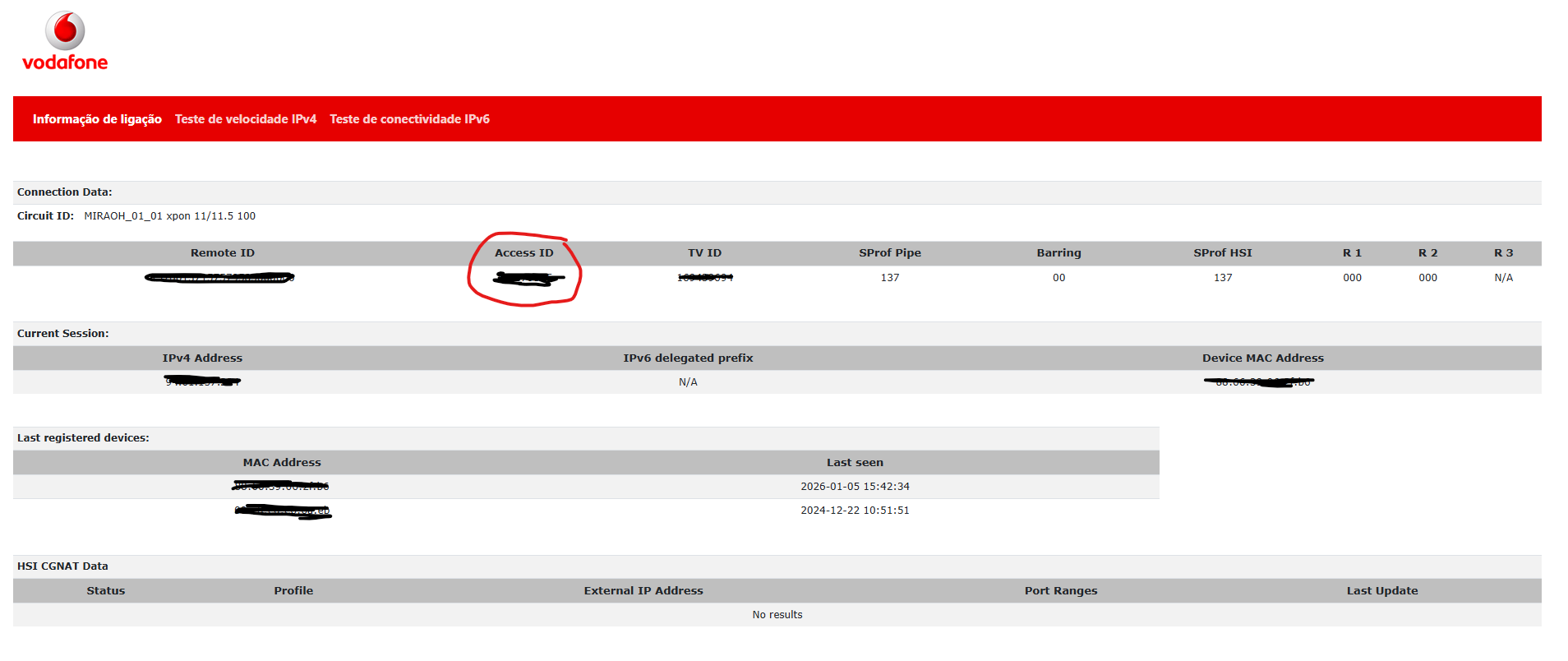
See that circled “Access ID”? That’s your golden ticket! It’s more valuable than Roy’s collection of avoided work tickets. Write this down somewhere safe (preferably not on a Post-it note stuck to your monitor like Jen would do).
Important: This page is only accessible from within your Vodafone home network. Try accessing it from your mobile data or a coffee shop, and you’ll get nothing. It’s like trying to use the IT support number after hours - technically it exists, but it won’t help you.
What You Need (The Shopping List)
For a successful VoIP configuration, you need:
- Access ID: From
https://acesso.vodafone.pt/external/info(the password) - Your Phone Number: You should already have this - it’s the number Vodafone gave you (format:
+351234096****)
That’s it! Just two things. Simpler than explaining to Jen what a browser is.
Configuring Asterisk SIP Trunk (For the Technical Wizards Among Us)
Now that we have our credentials, let’s configure an Asterisk SIP trunk. This is easier than explaining to Jen what “The Cloud” actually is (spoiler: it’s just someone else’s computer).
Here’s the configuration that actually works:
type=peer
disallow=all
nat=yes
host=ims.vodafone.pt
fromdomain=ims.vodafone.pt
;outboundproxy=proxythomson.ims.vodafone.pt
insecure=port,invite
qualify=250
username=+351234096****
fromuser=+351234096****
auth=+351234096****
secret=YOUR_ACCESS_ID_HERE
canreinvite=yes
allow=ulaw,alaw
directmedia=yes
context=from-trunk
The Critical Details (Pay Attention, This Is Important!)
Let me break down the important parts (like Moss explaining how computers work, but faster):
SIP Server:
ims.vodafone.pt- This is Vodafone’s IMS (IP Multimedia Subsystem) serverThe Commented Outbound Proxy: See that semicolon (
;) beforeoutboundproxy? That’s INTENTIONAL! It’s commented out on purpose, and this detail made all the difference between working VoIP and hours of frustrated debugging. It’s like that time Roy spent a whole day troubleshooting a computer that wasn’t plugged in. This small detail is what makes everything work!Username/Auth/FromUser: All should be your full phone number including country code (
+351234096****)Secret: This is where your “Access ID” from
https://acesso.vodafone.pt/external/infogoes. Guard it like Moss guards his collection of vintage calculators.Codecs: Vodafone uses
ulawandalaw. No fancy codecs here - just the classics!
Using MicroSIP (For the Desktop Warriors)
If you’re not running a full Asterisk server (and honestly, who has the time when there are websites to browse?), you can use MicroSIP for a simple desktop solution:
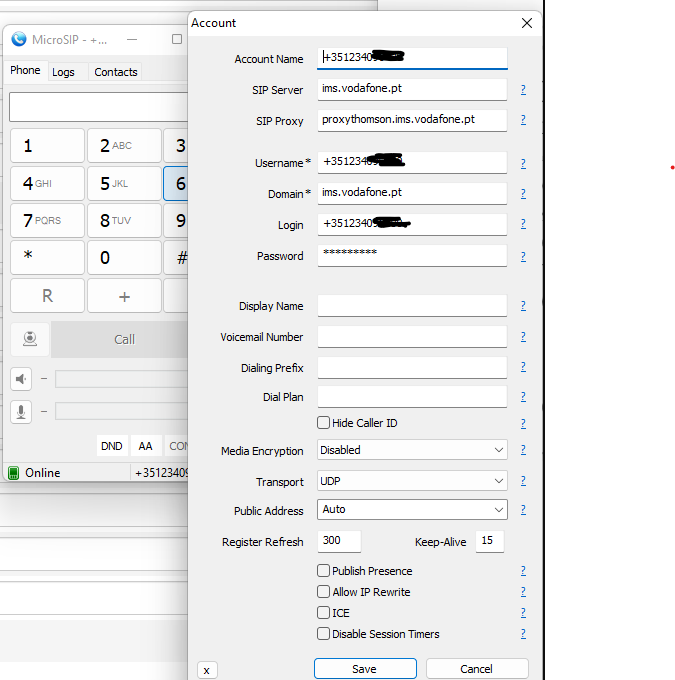
Configuration details:
- Account Name: Whatever you want to call it (I suggest “Vodafone That Finally Works”)
- SIP Server:
ims.vodafone.pt - SIP Proxy:
proxythomson.ims.vodafone.pt - Username:
+351234096****(your full Vodafone phone number) - Domain:
ims.vodafone.pt - Login:
+351234096****(yes, same as username) - Password: Your Access ID from
https://acesso.vodafone.pt/external/info - Transport: UDP (because TCP is for people who have time to wait)
- Register Refresh: 300 seconds
Click “Save” and watch the magic happen! You should see “Online” status faster than Roy can say “Have you tried turning it off and on again?”
Troubleshooting (When Things Go Wrong, And They Will)
Issue: Can’t Access the Credentials Page
Solution:
- Make sure you’re connected to your Vodafone home network
- Try both WiFi and wired connection
- Clear your browser cache (the solution to 50% of all problems, according to Roy)
- Make sure you’re using
https://nothttp://
Issue: Can’t Register to the SIP Server
Solution:
- Double-check that Access ID - one wrong digit and you’re locked out faster than Moss locks his desk drawer
- Make sure you’re using the full international format for your number (
+351prefix) - Verify your Access ID hasn’t changed (check the credentials page again)
Issue: Can Receive Calls But Can’t Make Them
Solution:
- Check your
fromdomainandfromusersettings in Asterisk - Ensure NAT is set to
yes(unless you enjoy one-way audio, which I doubt) - Verify the outbound proxy line is still commented out with
;
Issue: Robot Voice / Choppy Audio
Solution:
- Check your codec settings - stick with
ulawandalaw - Verify your network isn’t being saturated (stop downloading that Linux ISO, Roy!)
- Check your QoS settings if you’re running heavy traffic
Why This Matters (Beyond Just Being Able to Make Phone Calls)
Having access to your VoIP credentials means:
- Freedom to Choose Your Hardware: Use any SIP-compatible phone or software
- Integration Options: Connect to your Asterisk PBX, FreePBX, or any other system
- Advanced Features: Set up IVRs, call routing, voicemail-to-email, and more
- Cost Savings: No need for Vodafone’s proprietary equipment
- Learning Opportunity: Understanding how modern telephony actually works (knowledge is power, as Moss would say)
- Multi-Device Support: Use your phone number on multiple devices simultaneously
Important Notes (Read These or Risk Calling Roy for Help)
The Access ID Can Change: Sometimes after router firmware updates, Vodafone may regenerate your Access ID. If your SIP registration suddenly stops working, check
https://acesso.vodafone.pt/external/infoagain.Keep Your Credentials Secure: This Access ID is essentially your VoIP password. Don’t share it on the internet (unless you want random people making international calls on your dime).
Backup Your Config: Save your working configuration somewhere safe. It’s like Richmond’s emergency button - you hope you never need it, but you’ll be glad it’s there.
Home Network Only: Remember, you can only retrieve your credentials from your home network. Bookmark that URL for future reference.
The Semicolon Matters: Seriously, that commented-out proxy line is crucial. Don’t uncomment it unless you enjoy troubleshooting.
Conclusion
And there you have it! You’ve successfully liberated your Vodafone VoIP credentials and configured your own SIP client. It’s like escaping from a proprietary vendor lock-in, one Access ID at a time.
Your phone now works on your terms, with your equipment, running your software. It’s more liberating than that time the entire IT department discovered they could work from home.
The key takeaway? Sometimes the information you need is just a URL away - you just need to know where to look. It’s not hidden in some encrypted database or behind multiple support calls. Vodafone actually provides it; they just don’t advertise it (probably hoping you’ll keep using their equipment).
Remember: The best VoIP setup is like a good cup of tea - properly configured, always available, and doesn’t require calling support to use it.
Now go forth and make phone calls like the free digital citizen you are! And if anyone asks how you did it, just tell them you found the secret URL. Then watch their face light up like they’ve just discovered fire.
References
- Vodafone Credentials Page (Only works from home network - don’t try this at the coffee shop)
- Asterisk SIP Configuration (More documentation than Moss’s DVD collection)
- MicroSIP (Free, open-source, and actually works - the trifecta!)
- SIP Protocol Basics (If you have trouble sleeping)
P.S. - Have you tried turning your phone off and on again? Sometimes that actually helps with SIP registration issues. Roy was right all along!