Hello there! Maurice Moss speaking. Today we’re going to discuss something that nearly drove me to call 0118 999 881 999 119 725… 3 - enterprise SSDs that refuse to power on.
You know that feeling when you’ve just installed a beautiful, high-capacity enterprise SSD - perhaps a Micron 5100, an Intel DC series, or similar datacenter drive - and you’re ready to experience storage nirvana? Your HBA detects all your old drives perfectly. But these expensive new SSDs? Nothing. No detection, no activity lights, completely dead. It’s like trying to get Roy to answer a support call before his first coffee.
Don’t panic! Before you RMA those drives or blame your HBA firmware (or Richmond, who was definitely lurking near the server rack), check for the 3.3V Power Disable (PWDIS) issue.
What’s Happening (Or: The Curious Case of Pin 3)
Many modern enterprise drives include a Power Disable feature on pin 3 of the SATA power connector. When 3.3V voltage is present on this pin, the drive interprets it as a “stay powered off” signal. It’s quite elegant really, like a tiny butler standing at the door saying “No, sir, we are not receiving guests today.”
This feature is designed for enterprise hot-swap backplanes that need to control power sequencing - you know, those fancy systems where Douglas would approve the budget but have absolutely no idea what they do.
Here’s the problem: consumer and many server power supplies provide 3.3V on all their SATA power connectors. They’re just supplying standard power rails, being helpful. But enterprise SSDs see that 3.3V and think “I’ve been told to stay off” - so they never spin up.
It’s a bit like Jen pressing every button on the “Internet” box, except in this case, the button is being pressed for the drive, and it’s the wrong one.
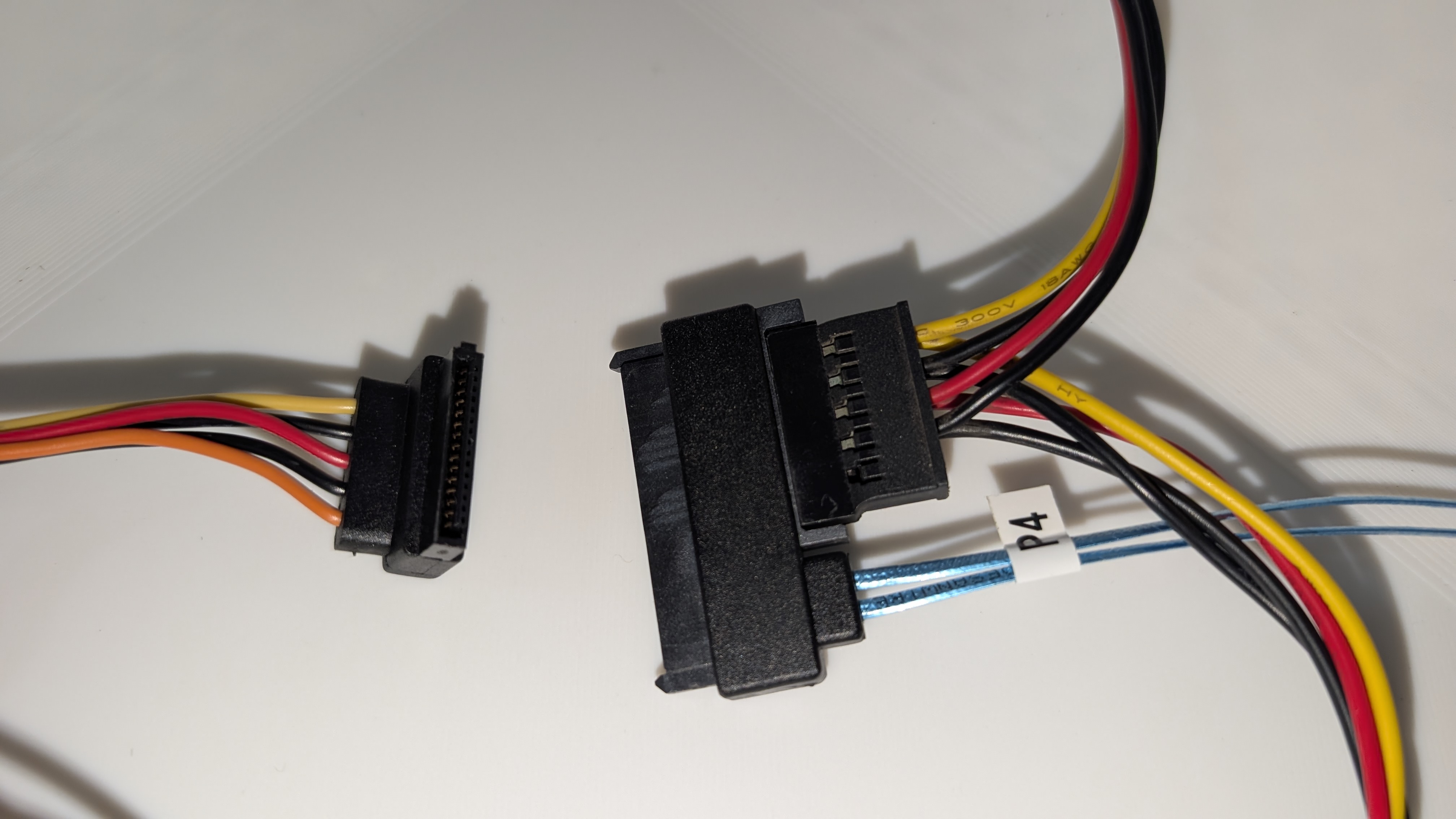 The culprit: that orange wire on the left connector carries the 3.3V signal that tells enterprise drives to stay powered off.
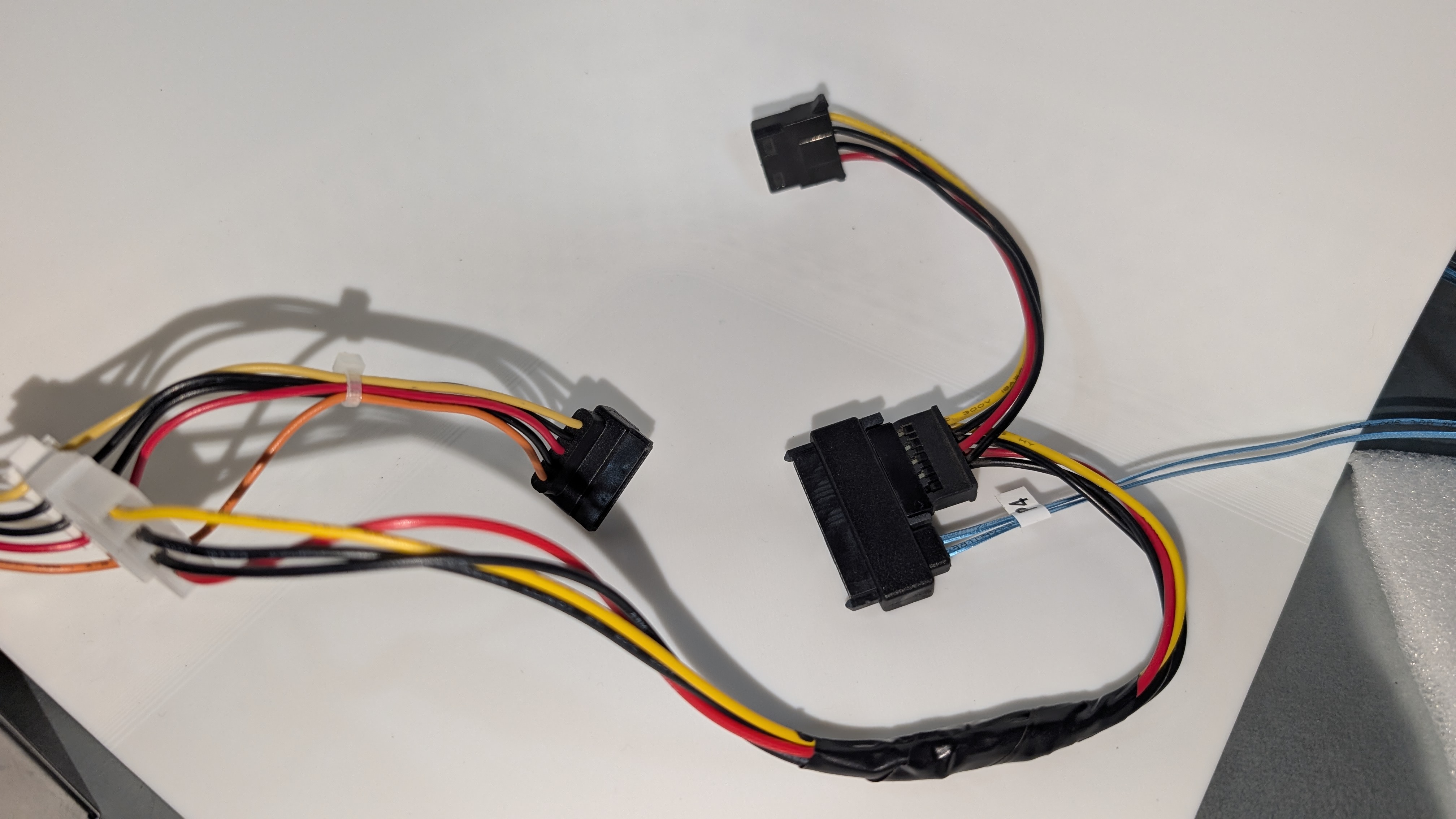 A wider view of the cable setup. The connector with the orange wire will cause issues with enterprise SSDs.
Why Your Older Drives Work Fine (Or: The Privilege of Ignorance)
Older drives - the pre-2015 vintage ones - typically don’t implement the PWDIS feature. They ignore whatever voltage is on pin 3 and power up normally, like Roy ignoring a ringing phone. This is why your trusty 15k RPM SAS drives from 2010 work perfectly, but your brand-new 7.68TB SSD from 2020 sits there doing its best impression of a very expensive paperweight.
Affected Drives (Or: The Usual Suspects)
Common enterprise SSDs with PWDIS include:
- Samsung PM1633a, PM1643a, PM1653 series
- Intel DC S3500, S3700, DC P4500, P4600 series
- Micron 5100, 5200, 5300 series
- WD/HGST Ultrastar DC series
- Most enterprise SAS SSDs manufactured after 2015
If your drive is on this list, there’s a very good chance it’s sitting in your server thinking “I shall not comply” like a petulant robot.
The Fix (Or: Three Ways to Outsmart Your Storage)
You have three options, ranging from “completely reversible” to “I hope you’re feeling confident”:
Option 1: Kapton Tape (The Moss-Approved Method)
Apply Kapton tape (or electrical tape, if you’re living dangerously like Roy) over pin 3 of the SATA power connector to block the 3.3V signal.
This is the safest, most reversible method. It’s like putting a tiny “Do Not Disturb” sign on that specific pin. The drive never sees the 3.3V, never gets the “stay off” signal, and powers up normally.
I keep a roll of Kapton tape next to my emergency fire extinguisher email template. You never know when you’ll need either.
Option 2: Molex Adapter (The Legacy Loophole)
Use a Molex 4-pin to SATA power adapter. These adapters are older than half the infrastructure in most offices, and crucially, Molex connectors don’t provide 3.3V at all.
It’s using vintage technology to solve a modern problem - a bit like how the original Internet (the black box with the blinking light) solved all of Reynholm Industries’ connectivity needs.
Option 3: Cut the Wire (The Permanent Solution)
If you’re confident - and I mean actually confident, not “Roy claiming he’s read the documentation” confident - you can carefully cut or remove the orange 3.3V wire from your SATA power cable.
This is permanent but effective. I’d recommend this only if you’re absolutely certain these cables will only ever power enterprise drives. It’s the IT equivalent of burning your ships after landing - there’s no going back.
How to Diagnose (Or: The Checklist of Despair)
Before you reach for the tape or wire cutters, let’s make sure this is actually the problem:
- ✓ Drive doesn’t show up in BIOS or OS
- ✓ No activity lights when powered on
- ✓ Older drives on the same cables/HBA work fine
- ✓ Drive is a modern enterprise SAS/SATA SSD (2015+)
If all four are true, it’s almost certainly the 3.3V PWDIS issue. Congratulations! Your drives aren’t broken - they’re just being excessively polite about following enterprise specifications.
The Bottom Line
Don’t throw away those expensive enterprise SSDs! A simple piece of tape or the right power adapter can bring them back to life. This is a compatibility quirk, not a defect - the drives are working exactly as designed for their intended enterprise environment.
It’s rather like discovering that Jen’s computer wasn’t broken, it just wasn’t plugged in. Except in this case, it’s plugged in too well, with a voltage signal it was never meant to receive.
If you need me, I’ll be in my office, cataloguing my Kapton tape collection by adhesive strength and temperature tolerance.
Written by Luis Sarabando, channeling his inner Maurice Moss from The IT Crowd with a little help from Claude.ai
P.S. Did you know? The probability of an IT professional encountering this issue and immediately assuming the drive is dead is approximately the same as Roy successfully completing a support call without saying “Have you tried turning it off and on again?” - which is to say, remarkably high.